TLDR
I built an open-source streaming lakehouse: Kafka ingests events, Flink processes them, Iceberg stores them as tables, Trino queries them, and Superset visualizes them. One
make democommand runs it all locally.Even when your data lands in Iceberg automatically (as it does with Confluent Tableflow), you still need a query engine and a visualization layer. This stack builds that full picture with open-source components.
MinIO went closed-source, so I switched to SeaweedFS (thanks to Robin Moffatt’s research). And Flink’s dependency management is still a jar-shaped nightmare.
Why I Built This
The streaming lakehouse pattern is straightforward: events flow into Kafka, a stream processor writes them to an open table format like Iceberg, and a query engine reads those tables for analytics. Confluent Cloud automates the Kafka-to-Iceberg step with Tableflow, but the query and visualization layers are still yours to build. Even with Tableflow, you need something to run SQL against those Iceberg tables and something to turn query results into dashboards.
The original inspiration for the Trino + Superset combination came from Olena Kutsenko and her streaming flight analytics workshop. She built the Confluent Cloud version with a Node.js data generator and showed how well Trino and Superset work together for streaming analytics. I took that idea and rebuilt it as a fully local, open-source stack (and my AI wrote the data generator in Python instead of Node.js, because apparently every language is acceptable as long as I don’t have to write it myself).
I wanted to build the entire stack with open-source components, running locally in Docker Compose, to understand what each piece does and where the sharp edges are. It’s the same reason I still change my own oil even though I could take the car to a shop.
I also wanted a portable demo stack for workshops and talks where attendees can run make demo and have the full pipeline running in five minutes.
For the managed version of this pattern, the Confluent Cloud workshop uses Tableflow for the Kafka-to-Iceberg step.
This repo is the fully open-source version for learning.
The repo is at github.com/gAmUssA/flink-trino-superset-pipeline.
The Architecture
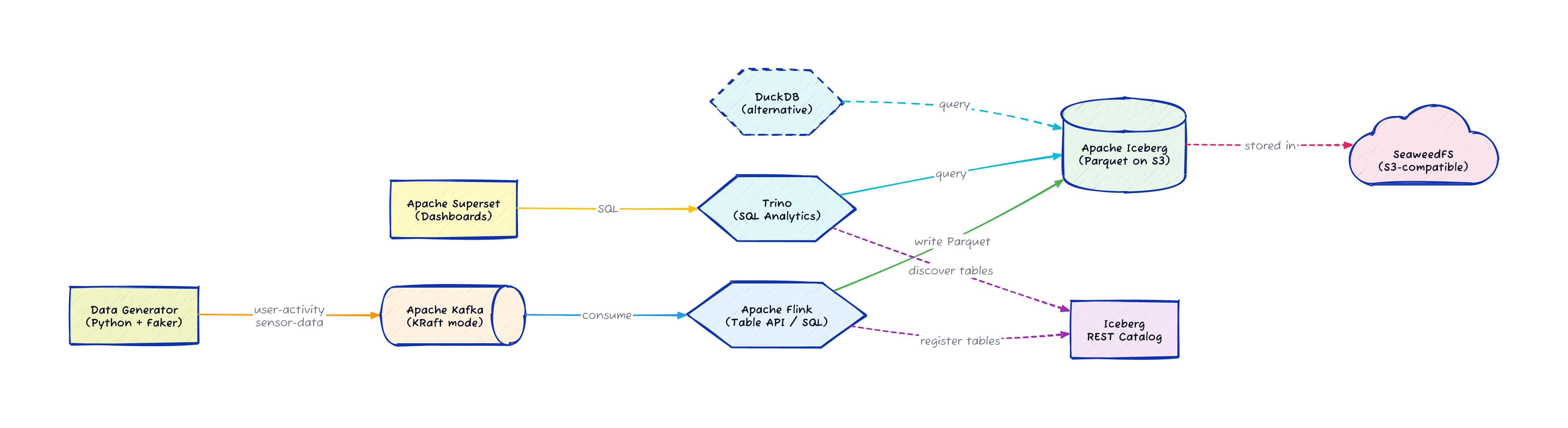
The pipeline has six stages running across nine Docker containers, all defined in a single docker-compose.yml:
A Python data generator uses the Faker library to produce synthetic events: user activity (page views, clicks, searches, purchases) and IoT sensor readings (temperature, humidity, pressure, light, motion)
Apache Kafka (running in KRaft mode, no ZooKeeper) receives the events as JSON on two topics:
user-activityandsensor-dataApache Flink reads from Kafka, transforms the data using the Table API, flattens nested JSON structures, and adds processing timestamps
Flink writes the processed data as Iceberg tables in Parquet format to SeaweedFS (S3-compatible object storage)
Trino connects to the Iceberg REST catalog and creates analytics views on top of the tables
Apache Superset connects to Trino and provides dashboards for visualization
Every component is a standard Docker image.
The whole stack starts with make demo and takes about five minutes on the first run.
Let me walk through the interesting parts of the code.
The Data Generator
Yes, the data generator is written in Python. I know. I can already hear you: "Viktor, I thought you hate Python?" I didn’t write it. Claude Code wrote it for me. I told it what events I needed, and it picked Python because Faker and the Confluent Kafka client are genuinely good libraries for this job. I’m not rewriting a data generator in Java out of principle when the AI already shipped a working one.
The generator produces two types of events. User activity events include page views, clicks, searches, and purchases with realistic metadata:
def generate_user_activity():
    user_id = str(random.randint(1, 1000))
    event_types = ['page_view', 'click', 'search', 'purchase', 'login', 'logout']
    event_type = random.choice(event_types)

    event = {
        'user_id': user_id,
        'event_type': event_type,
        'timestamp': datetime.now().isoformat(),
        'session_id': fake.uuid4(),
        'ip_address': fake.ipv4(),
        'user_agent': fake.user_agent()
    }
    # event-type-specific fields added here
    return user_id, event
Sensor data events simulate IoT readings with nested location objects:
def generate_sensor_data():
    sensor_id = f"sensor-{random.randint(1, 100)}"
    sensor_types = ['temperature', 'humidity', 'pressure', 'light', 'motion']
    sensor_type = random.choice(sensor_types)

    data = {
        'sensor_id': sensor_id,
        'sensor_type': sensor_type,
        'timestamp': datetime.now().isoformat(),
        'location': {
            'lat': float(fake.latitude()),
            'lon': float(fake.longitude()),
            'facility': fake.company()
        },
        'battery_level': random.uniform(0, 100)
    }
    return sensor_id, data
The main loop produces events at random intervals and sends them to Kafka using the Confluent Python client. The producer retries connection for up to 30 attempts on startup, which matters when Docker Compose services start in parallel and Kafka takes a few seconds to become available.
Flink SQL: Kafka to Iceberg
The Flink SQL job defines a Kafka source table, an Iceberg sink table, and an INSERT INTO … SELECT that connects them.
Here is the interesting part:
-- Iceberg catalog pointing to the REST catalog and SeaweedFS
CREATE CATALOG iceberg_catalog WITH (
  'type'='iceberg',
  'catalog-type'='rest',
  'uri'='http://iceberg-rest:8181',
  'warehouse'='s3://warehouse/',
  'io-impl'='org.apache.iceberg.aws.s3.S3FileIO',
  's3.endpoint'='http://minio:9000',
  's3.path-style-access'='true'
);

-- Kafka source with watermarks for event-time processing
CREATE TABLE IF NOT EXISTS user_activity_source (
  user_id STRING,
  event_type STRING,
  `timestamp` TIMESTAMP(3),
  session_id STRING,
  page_url STRING,
  search_query STRING,
  total_amount DOUBLE,
  -- ... additional fields
  WATERMARK FOR `timestamp` AS `timestamp` - INTERVAL '5' SECOND
) WITH (
  'connector' = 'kafka',
  'topic' = 'user-activity',
  'properties.bootstrap.servers' = 'kafka:9092',
  'scan.startup.mode' = 'earliest-offset',
  'format' = 'json',
  'json.timestamp-format.standard' = 'ISO-8601'
);

-- Continuous INSERT from Kafka source to Iceberg sink
INSERT INTO user_activity
SELECT
  user_id, event_type,
  `timestamp` AS event_time,
  session_id, page_url, search_query, total_amount,
  CURRENT_TIMESTAMP AS processing_time
FROM user_activity_source;
This is a streaming job.
It runs continuously, consuming from Kafka and writing Parquet files to Iceberg through the REST catalog.
The WATERMARK clause enables event-time processing so Flink can handle out-of-order events correctly.
Trino Analytics Views
Once Flink populates the Iceberg tables, Trino creates analytics views on top of them:
CREATE OR REPLACE VIEW iceberg.warehouse.hourly_user_activity AS
SELECT
    date_trunc('hour', event_time) AS hour,
    event_type,
    COUNT(*) AS event_count
FROM iceberg.warehouse.user_activity
GROUP BY date_trunc('hour', event_time), event_type;

CREATE OR REPLACE VIEW iceberg.warehouse.sensor_stats AS
SELECT
    date_trunc('hour', event_time) AS hour,
    sensor_type, facility,
    COUNT(*) AS reading_count,
    AVG(reading) AS avg_value,
    MIN(reading) AS min_value,
    MAX(reading) AS max_value
FROM iceberg.warehouse.sensor_data
GROUP BY date_trunc('hour', event_time), sensor_type, facility;
These views run standard SQL against Iceberg tables stored as Parquet files in SeaweedFS. Trino connects to the Iceberg REST catalog with a simple properties file:
connector.name=iceberg
iceberg.catalog.type=rest
iceberg.rest-catalog.uri=http://iceberg-rest:8181
iceberg.rest-catalog.warehouse=s3://warehouse
iceberg.file-format=PARQUET
fs.native-s3.enabled=true
s3.endpoint=http://minio:9000
s3.path-style-access=true
Superset then connects to Trino and builds dashboards on these views. The SQL is the same SQL you’d write against any database, which is the whole point of the lakehouse approach.
| Component | Version | Role |
|---|---|---|
Apache Kafka | 3.9.0 | Event streaming (KRaft mode) |
Apache Flink | 1.20.0 | Stream processing via Table API |
Apache Iceberg | 1.8.1 | Open table format with REST catalog |
SeaweedFS | latest | S3-compatible object storage |
Trino | latest | Distributed SQL query engine |
Apache Superset | 4.1.1 | Dashboards and visualization |
Why Iceberg
Iceberg is the open table format everyone is talking about right now, and for good reason. It gives you ACID transactions, schema evolution, time travel queries, and partition pruning on top of files stored in object storage. Your data stays in Parquet files in S3 (or in this case, SeaweedFS), and any engine that speaks Iceberg can read it: Trino, Spark, Flink, Snowflake, BigQuery.
The reason I chose Iceberg for this stack is that it’s the format Confluent Tableflow writes to. Building the open-source version with the same table format means the query and visualization layers (Trino + Superset) work identically whether your Iceberg tables come from Flink running locally or from Tableflow running in the cloud.
The MinIO Problem (and SeaweedFS Solution)
Every Iceberg-on-your-laptop tutorial from the last three years uses MinIO for S3-compatible storage. It was the default choice. Then MinIO’s company abandoned the open-source project in late 2025 and closed-sourced their container images.
This broke a LOT of demos and development pipelines. I hit this wall and started looking for alternatives. Fortunately, Robin Moffatt had already done the research. He tested seven alternatives against criteria that matter for demo and development use: Docker availability, S3 compatibility, open-source licensing, single-node simplicity, and community health.
His pick was SeaweedFS, which has been around since 2012, runs under the Apache 2.0 license, and provides S3-compatible storage with a reasonable configuration footprint. After Robin’s post went up, the SeaweedFS team responded by simplifying their configuration further. I switched the pipeline to SeaweedFS and it has been stable since.
The lesson here is worth remembering. MinIO was the default for years, and it disappeared from the open-source landscape overnight. The only S3-compatible storage project with foundation backing is Apache Ozone, and it requires four nodes minimum. Everyone else is one licensing decision away from the same situation.
The Flink Dependency Nightmare
If you look at the Flink Dockerfile in the repo, you’ll see the part of this project that caused the most frustration.
Flink’s connector ecosystem relies on downloading specific JARs and placing them in the right directory. The Kafka connector, the Iceberg connector, the Hadoop dependencies for S3, the AWS SDK bundles, and every transitive dependency they need. Getting the right combination of versions that all work together without classpath conflicts is an exercise in patience. And the error messages when something is wrong are rarely helpful.
This is the gap between "Flink supports Iceberg" (true) and "you can easily connect Flink to Iceberg" (depends on your definition of easily). The Flink community knows this is a problem, and the connector packaging is improving, but today you still spend real time debugging jar conflicts and missing classes.
I documented the working combination in the Dockerfile so nobody else has to figure it out from scratch. If Flink updates break something, the CI pipeline will catch it.
The Query Layer: Trino (and DuckDB)
Once your data lands in Iceberg, you need a query engine to read it. I chose Trino because it handles concurrent queries from multiple users well, which matters when Superset dashboards are refreshing on a schedule and analysts are running ad-hoc queries at the same time. Trino also speaks the Iceberg REST catalog protocol natively, so connecting it to the catalog is a one-file configuration.
That said, Trino is a distributed engine designed for multi-node deployments. For a local development setup, it’s more infrastructure than you strictly need.
DuckDB is a lighter alternative that reads Iceberg tables directly. The DuckDB Iceberg extension supports schema evolution, time travel, partition pruning, and both Iceberg v1 and v2 formats. You can query Confluent Tableflow Iceberg tables with DuckDB as well, and it even runs in the browser. If you’re exploring data locally or building a single-user notebook workflow, DuckDB with the Iceberg extension might be all you need.
I kept Trino in this stack because Superset expects a server it can connect to over JDBC/ODBC, and Trino fills that role cleanly. But swapping Trino for DuckDB in a Python notebook scenario is a valid simplification.
Why Superset Still Matters
The streaming lakehouse gets your data from Kafka into queryable Iceberg tables. That’s the hard part, and it’s the part most blog posts stop at. But data sitting in Iceberg tables that nobody looks at is just storage costs.
Superset is the visualization layer that turns SQL queries into dashboards people actually use. It connects to Trino (or any SQL engine), runs scheduled queries, and renders charts that business users can interact with without writing SQL themselves. In this stack, Superset is what makes the pipeline useful rather than just technically interesting.
I picked Superset over Grafana because Superset is built for SQL analytics dashboards, while Grafana is optimized for time-series metrics and monitoring. I considered Metabase, which has a friendlier onboarding experience, but Superset’s SQL Lab gives power users more flexibility and its Trino integration is mature.
Running It Yourself
The repo is at github.com/gAmUssA/flink-trino-superset-pipeline.
Prerequisites: Docker, Docker Compose (OrbStack recommended on macOS), and Java 17+ for building the Flink jobs.
git clone https://github.com/gAmUssA/flink-trino-superset-pipeline.git
cd flink-trino-superset-pipeline
make demo
That single command builds the Flink JARs, starts all nine services, waits for them to be healthy, deploys the Flink jobs, creates Trino analytics views, sets up Superset, and verifies everything works. About five minutes on a first run.
Once it’s up:
Flink Dashboard at http://localhost:8081
Trino UI at http://localhost:8082/ui/ (login: admin)
Superset at http://localhost:8088 (login: admin/admin)
SeaweedFS console at http://localhost:9001
To tear it all down: make destroy.
What I’d Like to Add
More Flink SQL jobs showing windowed aggregations and temporal joins on the sensor data
A DuckDB option alongside Trino for lighter-weight local querying
A comparison of query performance between Trino, DuckDB, and Flink SQL reading from the same Iceberg tables
Pre-built Superset dashboards that ship with the demo
If you run into issues or have ideas, open a GitHub issue at the repo. Pull requests welcome.