TLDR
OpenCode and Pi work as coding agents on a local Ollama model. They can edit files, run commands, and keep everything on your laptop. I always use them in a tmux environment.
qwen2.5-coder:7bis fast but only replies in plain text, so neither agent can use tool calls with it. On my machine, onlyqwen3-coder:30bcreates usable tool_calls, which lets the agents actually do things.OpenCode uses MCP to communicate, but Pi does not. Both agents, along with Claude Code, can use the same
SKILL.mdfile in~/.agents/skills/.
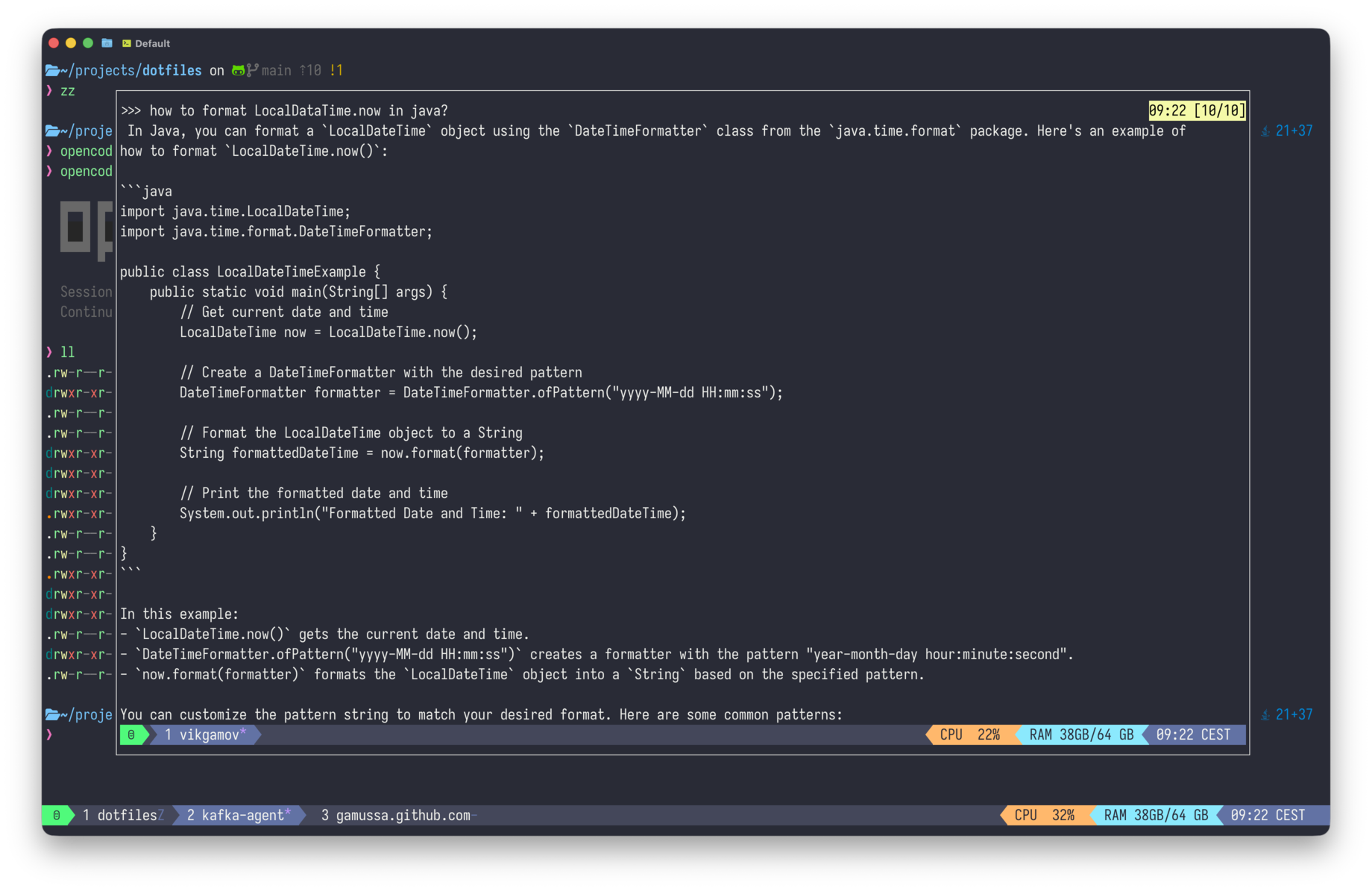
The pop-up from part one is great for one thing: answering questions.
You hit prefix + a, choose a model, ask something like "how do I format a LocalDateTime in Java," read the answer, type /bye, and the whole chat ends up on your clipboard. Nice!
That’s the main benefit when I’m offline on a flight.
Last week, I spent three hours working on a Hugo theme during a flight. I wasn’t looking for answers. What I really needed was hands-on help. I needed to edit the template, run the build, check the error, fix the template, and build again. My tmux pop-up can’t do those things.
That’s where I need a coding agent. The one I usually use is Claude Code, but at 35,000 feet, it’s not available.
Same chassis, third AI
Part one put Ollama in a tmux pop-up for quick questions. Part two put Claude Code in the same chassis for real project work. This is part three, and the question is simple: what do you use for coding when Claude isn’t available, either because there’s no signal or because you want to keep your data on your laptop?
I needed something that could read and write files, run bash, check the output, and repeat the process.
There are two open-source options that run locally: OpenCode and Pi.

Two contenders
OpenCode is the main one. Its core is TypeScript running on Bun, with a Go terminal UI, shipped as a self-contained binary — and it’s the most popular open-source coding agent, with 161k stars on GitHub. It works with many providers, including a local Ollama. Pi is at the other end of the spectrum. It’s lightweight, installed with npm, and written by Mario Zechner. Pi focuses on just four core tools: read, write, edit, and bash.
$ brew install sst/tap/opencode            # OpenCode
$ npm  i -g @mariozechner/pi-coding-agent   # Pi (scope moving to @earendil-works/pi-coding-agent)
$ opencode --version   # 1.14.48
$ pi --version         # 0.66.1
$ ollama --version     # 0.24.0
Both were already on my machine, neither pointed at Ollama yet. With 64 GB of RAM, model size wasn’t going to be an issue.
The real problem was somewhere else.
The model that can’t tool-call
Here’s the main point: a good coding session depends not just on the agent, but also on whether the model supports tool calls. The agent asks the model which tool to use, and the model has to give a structured response so the agent can act.
An agent works by asking the model "which tool do you want, and with what arguments."
The model should reply in a structured format that the runtime can understand, using native tool_calls.
If the model just describes the call in plain text, like "I’ll now write the file with the following content…", the runtime only gets text, not an instruction, so nothing happens.
My pop-up’s favorite is qwen2.5-coder:7b.
Fast cold start, good enough for shell one-liners.
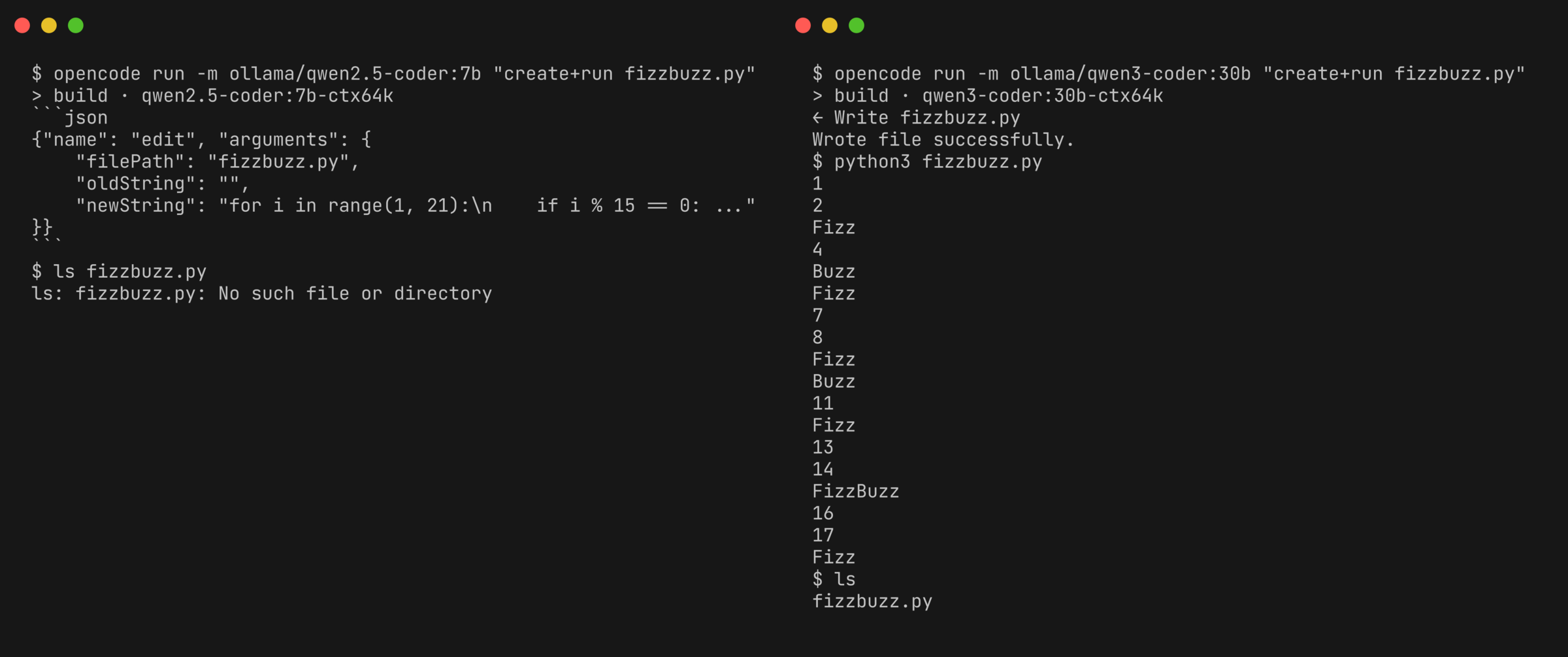
I pointed both agents at it and asked for FizzBuzz: write the file, run it, and show me the output.
Neither wrote a file.
Both narrated instead of acting.
OpenCode answered with a fenced bash block describing the commands it would run.
Pi got one step further into the motion, emitting the tool-call JSON as text before it stopped.
The model knew what to do, but just described it instead of actually doing it—like my son talking about chores instead of doing them.
One curl to Ollama explains it. Same prompt, one tool defined, two models:
$ curl -s localhost:11434/api/chat -d '{
    "model": "qwen2.5-coder:7b",
    "messages": [{"role":"user","content":"write hello.txt with hi, use write_file"}],
    "stream": false,
    "tools": [{"type":"function","function":{"name":"write_file", ...}}]
  }' | jq '.message | {content, tool_calls}'
qwen2.5-coder:7b hands back the call as a string and leaves tool_calls empty:
{ "content": "{ \"name\": \"write_file\", \"arguments\": {...} }", "tool_calls": null }qwen3-coder:30b, same request, returns the real thing:
{ "content": "", "tool_calls": [ { "function": { "name": "write_file", "arguments": {"path":"hello.txt","content":"hi"} } } ] }So the ranking for the pop-up changes completely.
The small 7b model that’s great for quick starts is useless in this case.
The 18 GB qwen3-coder:30b model, which I wouldn’t use in a pop-up because it takes nine seconds to load, is the one that actually works.
Both agents wrote and ran FizzBuzz with it on the first try, i % 15 and all.
Choose the model that supports tool-calls. Everything else is just extra.
Wiring it up
Agents need a lot of context to work well. Ollama sets every model to a 4,096-token window by default. OpenCode needs at least 64k tokens before its file-editing tools work properly. If I raised the limit for all models, it would slow down the pop-up. So I made a 64k version using a simple two-line Modelfile:
FROM qwen3-coder:30b
PARAMETER num_ctx 65536
Running ollama create qwen3-coder:30b-ctx64k -f Modelfile reuses the original blobs. The new tag uses the same weights but with a bigger context window, so it doesn’t take up more disk space.
My blobs directory stayed at 38 GB.
Then I set up each agent with a config that points to the local endpoint.
OpenCode’s lives in opencode.json, and the first line sets the default model, so opencode run needs no flags:
{
  "$schema": "https://opencode.ai/config.json",
  "model": "ollama/qwen3-coder:30b-ctx64k",
  "provider": {
    "ollama": {
      "npm": "@ai-sdk/openai-compatible",
      "name": "Ollama (local)",
      "options": { "baseURL": "http://localhost:11434/v1" },
      "models": {
        "qwen3-coder:30b-ctx64k": {
          "name": "qwen3-coder 30b (64k, agentic)",
          "limit": { "context": 65536, "output": 8192 }
        }
      }
    }
  }
}
Pi’s is a four-line models.json in the same spirit.
I put both files in my dotfiles and use linkall.sh to symlink them. That way, I can set up a new laptop with just one script.
I never put API keys in the repo, which is important for what comes next.
Search: MCP one way, a skill the other
A coding agent that can’t search the web is only half as useful. I wanted web search, and this is where OpenCode and Pi really differ.
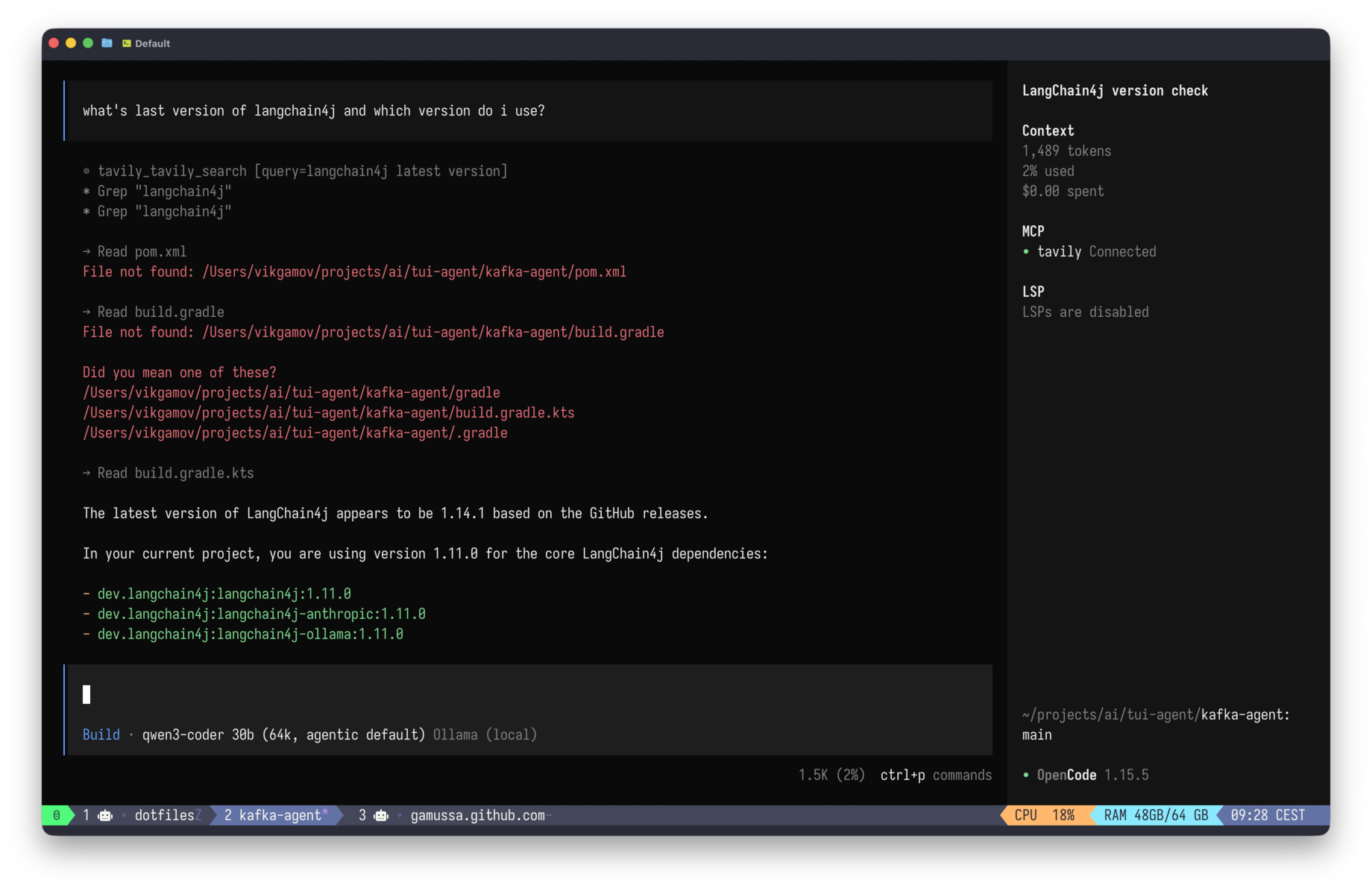
OpenCode supports MCP. I added Tavily as a remote MCP server, with the key read from the environment, so it never lands in a committed file:
"mcp": {
  "tavily": {
    "type": "remote",
    "url": "https://mcp.tavily.com/mcp/?tavilyApiKey={env:TAVILY_API_KEY}",
    "enabled": true
  }
}
Asked for the latest Ollama version, it chained two tools on its own: tavily_search, then tavily_extract, on the GitHub releases page, and returned v0.30.0 and a source link.
| It’s pre-release but still. I’m on 0.24.0. |
Pi doesn’t support MCP. It’s not just a missing feature—the README is clear: no MCP. Instead, you build a CLI tool with a README. At first, this feels like a big feature gap. But then you realize it’s the classic Unix-like approach: a tool is just a program you can run.
So Tavily becomes a skill — a folder with a SKILL.md that says when to use it and a search.sh that curls the API:
---
name: tavily-search
description: Web search via the Tavily API. Use for current info — release versions, docs, news. Requires TAVILY_API_KEY.
---
# Tavily Search
./search.sh "your query"      # top 5 results, answer + sources
That’s when I stopped being annoyed with Pi.
Skills use an open standard, and the discovery paths overlap. If you drop the folder in ~/.agents/skills/, OpenCode, Pi, and Claude Code will all find it.
One skill works with all three agents.
I added tavily-search to the skills I already had, and saw both local agents use the same search.sh script.
What it can’t do
Now for the part where I admit - it’s not Claude Code :( .
When Pi ran the same Tavily search, it didn’t find the GitHub page like OpenCode did.
Instead, it found two SEO blogs, read "v0.6.2" from one and "v0.9.6" from another, and confidently reported the wrong version.
It was the same API and the same model, but the reasoning over the results was weaker.
qwen3-coder:30b is good at coding but not great at research, and it doesn’t know the difference.
There’s more: it takes nine seconds to load the first time, and sometimes the tool-call formatting slips back into plain text on the 30b if I ask it to "run this exact command" instead of "find me X." The quality is still much lower than Opus.
So this setup is just a fallback. It’s what you use when the better option isn’t available — either offline or when you have data that shouldn’t leave your machine. A local agent which mostly works is better than a great one you can’t access.
The pop-up answered my questions on the plane. Now, the same tmux window has an agent that edits files and runs commands on a model that never connects to the internet. It’s slower than Claude and makes more mistakes. But al least it doesn’t need an internet connection.
Next time the wifi cuts out mid-flight, I’ll see how much that matters.