Java demo repository | Difficulty: Intermediate Java | Format: Seven chapters with code and exercises
Build a Java assistant one capability at a time, following the rounds of Codepocalypse Now: LangChain4j vs. JetBrains Koog. Each chapter explains the API that introduces the next capability, gives you an experiment to run, and identifies a pattern you can use in your own application. The examples use LangChain4j builders and Java interfaces directly.
Our fictional assistant helps Viktor draft a decline for an internal training session. Calendar and organizer integrations are local MCP mocks; the organizer contacts nobody. Live chapters call hosted model APIs that may bill your accounts: Gemini for chat, Jev for decisions, Claude for drafting, and OpenAI for review. In chapters 5–7, one request can make up to seven Claude drafting calls and seven OpenAI review calls. The useful engineering problem is broader: how do you turn a generated suggestion into a grounded, reviewed, explicitly approved action?
What you’ll build
A Java assistant grounded in calendar tools and durable decline history.
Typed intent and event decisions, followed by a canonical Java request.
Separate Draft and Judge agents with a bounded refinement loop.
Human approval tied to the current message, followed by receipt-checked history.
A local trace showing which models, tools, and workflow stages ran.
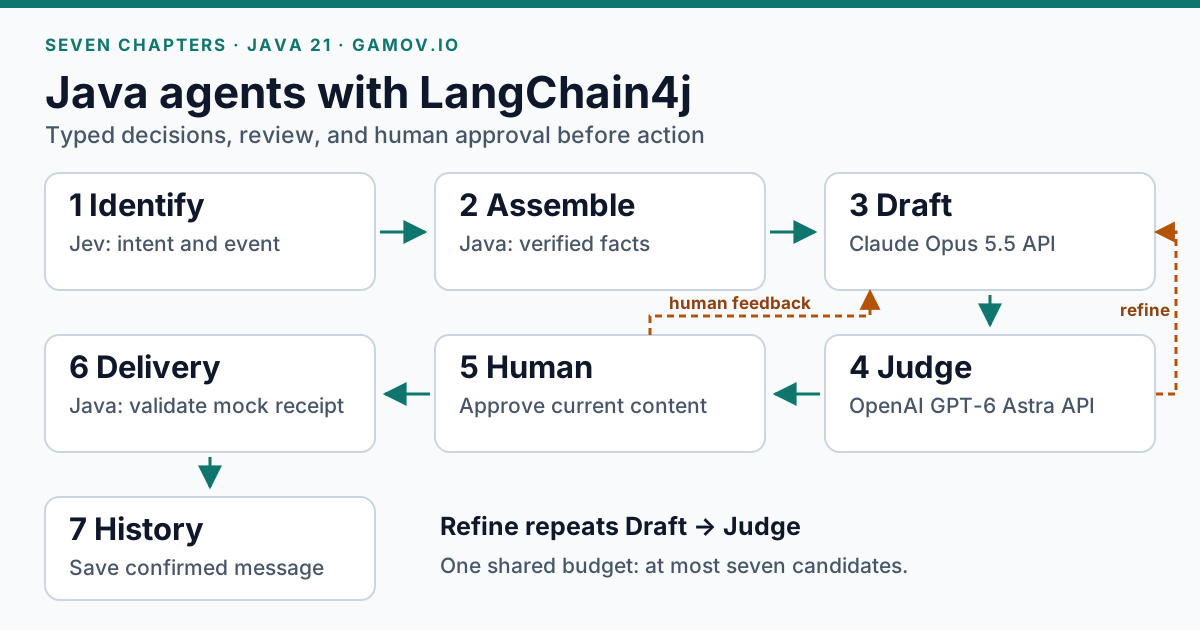
Identify selects the intent and event. Java assembles the facts, then Draft and Judge produce a reviewed proposal. Human approval and a matching delivery receipt are required before Java records the message in history. On small screens, scroll the diagram and tables sideways.
Set up the Java demo
Use JDK 21 and clone the Java demo repository. The project includes a Gradle wrapper and a launcher that downloads the pinned shared fixtures and builds the mock servers. Application and test sources are Java; the shared domain, mock servers, and TamboUI display are dependencies implemented in Kotlin.
Start from the demo project root:
git clone https://github.com/gamussa/jclaw-devoxx-be-2026.git
cd jclaw-devoxx-be-2026
cp .env.example .env
# Edit .env: set GOOGLE_API_KEY for live chat.
# Chapters 5–7 also need TYPESAFE_API_KEY, ANTHROPIC_API_KEY, and OPENAI_API_KEY.
./jclaw preview
Obtain your own Google AI Studio key for every live chapter.
Chapters 5–7 also need TypeSafe, Anthropic, and OpenAI API credentials.
Keep keys in your local .env, outside Git.
preview displays prepared UI data without model calls or actions; it checks the layout.
The Java demo pins these LangChain4j modules:
1.21.0:
langchain4j,langchain4j-anthropic,langchain4j-open-ai,langchain4j-http-client-jdk.1.21.0-beta31:
langchain4j-google-genai,langchain4j-agentic,langchain4j-mcp,langchain4j-typesafe.
The Gemini integration uses Google’s Java SDK, pinned to com.google.genai:google-genai:1.71.0.
Gemini calls allow one attempt at both SDK and LangChain4j layers.
Keep these versions together when reproducing the workshop. The agentic and decision APIs are experimental; consult the linked documentation when upgrading.
The small Java fragments below belong inside the accompanying application and omit surrounding imports and unchanged plumbing.
Names such as McpTools, SkillCatalog, Workflow, and the decline records are application classes, not LangChain4j APIs.
Read the indicated source files alongside each fragment.
Java sources live under app/src/main/java/dev/gamov/jclaw/.
The package names describe each class’s responsibility:
| Package | Classes to explore |
|---|---|
|
|
|
|
|
|
|
|
|
|
|
|
|
|
|
|
|
|
For example, agent/Workflow.java means dev.gamov.jclaw.agent.Workflow.
The typed records in the examples come from dev.gamov.jclaw.domain.Contracts.
Tests mirror the production packages, with shared provider fixtures in the test-only testing package.
The executable entry point is dev.gamov.jclaw.app.Main; the ./jclaw commands stay the same.
Every chapter’s Try it section includes its own checkout, credentials, launch command, prompts, and expected results.
You can start at any chapter with JDK 21, Git, and a Bash-compatible terminal available.
Each exercise creates a uniquely named directory under your terminal’s current directory and checks out the matching published round/… branch.
Its conversation and local outcome history belong to that checkout, so earlier exercises cannot change its starting state.
The three committed prior-decline documents are still available wherever the chapter enables retrieval.
Stop an existing dashboard with Ctrl+C before starting another exercise; plain mode uses /quit.
Keep each exercise’s prompts in the app and its shell commands in the terminal.
You can append plain to a launch command for scrolling output and use /copy reply or /copy candidate to copy only that panel’s content.
The launcher builds the selected checkpoint but never switches branches itself.
Keep credentials in the checkout’s local .env; exported settings take precedence over that file.
For your own code changes, create a branch with git switch -c my-workshop-changes in the exercise checkout.
Chapter 1 — A Java interface for conversation
Learn: ChatModel, AiServices.builder, @SystemMessage, @UserMessage, and @V.
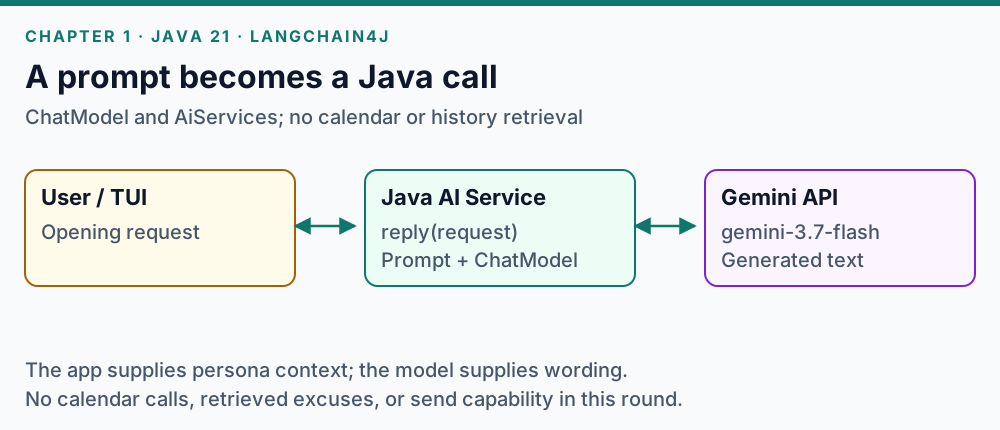
Java binds the input to the AI Service prompt and calls Gemini. The model returns wording; this round reads no calendar or history.
The model generates text. An AI Service gives that interaction an ordinary Java method signature:
interface Assistant {
    @SystemMessage("You are Viktor's assistant. Draft suggestions only.")
    @UserMessage("{{request}}")
    String reply(@V("request") String request);
}

ChatModel model = GoogleGenAiChatModel.builder()
        .apiKey(System.getenv("GOOGLE_API_KEY"))
        .modelName(System.getenv("JCLAW_CHAT_MODEL"))
        .build();

Assistant assistant = AiServices.builder(Assistant.class)
        .chatModel(model)
        .build();
For this isolated example, set JCLAW_CHAT_MODEL to a Gemini model available to your account.
The demo launcher instead resolves its role configuration and current defaults in model/ModelLineup.java.
@V explicitly binds a Java argument to the prompt variable.
Try it: compare replies without tools
With JDK 21 available, open a terminal and create this chapter’s checkout:
jclaw_round_dir=$(mktemp -d "$PWD/jclaw-round-01.XXXXXX")
git clone --branch round/01-chatbot --single-branch \
  https://github.com/gamussa/jclaw-devoxx-be-2026.git "$jclaw_round_dir"
cd "$jclaw_round_dir"
cp .env.example .env
Open
.envin your editor and setGOOGLE_API_KEYto your Google AI Studio key. Save the file, then launch:./jclaw chatbotPaste this complete request into the app:
Get me out of the Basic AI Proficiency Training on Tuesday, run by Dana from People Ops. Don't reuse an excuse I've already used on her - tell me which ones you're avoiding.Expected: A conversational reply, zero tool calls, and no delivery or history write. This chapter cannot retrieve past excuses; any list it invents is unsupported.
Paste a second, self-contained request to compare the wording:
Draft a one-sentence, polite request from Viktor to Dana from People Ops asking to skip Tuesday's Basic AI Proficiency Training. Do not invent a reason or claim to know my past excuses.Expected: Another text reply with no tool calls. There is no conversation memory in this round, so the second prompt supplies all its own context. Stop the dashboard with Ctrl+C.
Adopt: Keep the provider behind ChatModel and expose a domain-oriented interface to callers.
The system prompt guides wording; later chapters add application controls for actions.
Read the code: agent/AgentRoles.java, app/DemoSession.java, model/ModelLineup.java.
Official documentation: AI Services and Google Gen AI.
Chapter 2 — Ground answers with tools and MCP
Learn: @Tool, @P, .tools(…), StdioMcpTransport, and DefaultMcpClient.
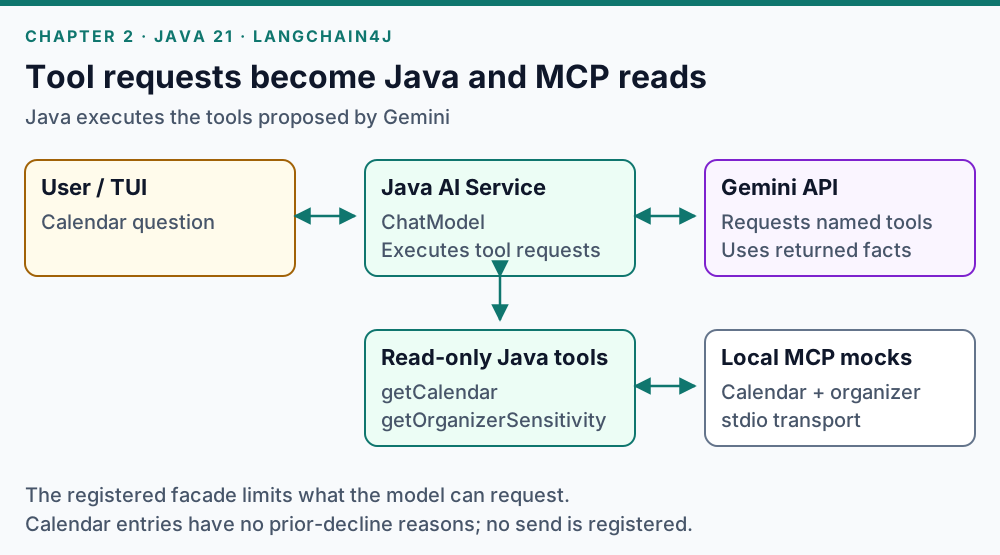
Gemini proposes a tool request; the Java AI Service executes the registered facade. The facade calls the local MCP mocks and returns their results to the model.
Register a narrow Java façade over the MCP integration:
final class CalendarTools {
    private final McpTools mcp;

    CalendarTools(McpTools mcp) { this.mcp = mcp; }

    @Tool("Read the calendar. Declined entries do not contain their reasons.")
    public String getCalendar() {
        return mcp.calendarJson();
    }

    @Tool("Read sensitivity for the exact organizer.")
    public String getOrganizerSensitivity(
            @P(name = "name", description = "Exact organizer name") String name) {
        return mcp.sensitivity(name);
    }
}

Assistant assistant = AiServices.builder(Assistant.class)
        .chatModel(model)
        .tools(new CalendarTools(mcp))
        .build();
The underlying native client starts a local server process:
var transport = StdioMcpTransport.builder()
        .command(List.of(javaExecutable, "-jar", calendarJar))
        .logEvents(false)
        .build();
var client = DefaultMcpClient.builder()
        .key("calendar")
        .transport(transport)
        .build();
// The owning application closes client when the session ends.
javaExecutable and calendarJar are resolved paths in tools/McpTools.java.
That class executes named MCP requests and validates results; the model-facing façade exposes only reads.
MCP supplies the transport and tool contract. The registered façade determines which capabilities this assistant can request.
Try it: inspect grounded calendar answers
With JDK 21 available, open a terminal and create this chapter’s checkout:
jclaw_round_dir=$(mktemp -d "$PWD/jclaw-round-02.XXXXXX")
git clone --branch round/02-tools --single-branch \
  https://github.com/gamussa/jclaw-devoxx-be-2026.git "$jclaw_round_dir"
cd "$jclaw_round_dir"
cp .env.example .env
Set
GOOGLE_API_KEYin.env, save the file, and launch:./jclaw toolsPaste this request into the app:
Look up the Basic AI Proficiency Training on Tuesday, run by Dana from People Ops. Tell me its exact date, start time, time zone, and Dana's organizer sensitivity. Use the calendar and organizer tools; do not draft a decline yet.Press F3 TRACE and inspect the
getCalendarandgetOrganizerSensitivityrequests and their returned values.Expected: Successful reads support Tuesday, October 6, 2026 at 15:00 CEST and sensitivity
TOUCHY. The time belongs to the fictional calendar, not the conference schedule. No decline is sent or recorded.Paste this independent follow-up:
Which reasons have I previously used to decline events organized by Dana from People Ops? If the available tools do not contain those reasons, say that you cannot retrieve them.Expected: Previous decline reasons remain unavailable: calendar entries identify declined events but do not store their excuses. Stop the dashboard with Ctrl+C.
Adopt: Expose the smallest useful tool surface. Keep a future send operation under application control.
Read the code: tools/McpTools.java, especially ReadOnly and the boot method that builds each DefaultMcpClient.
Official documentation: Tools and MCP integration.
Chapter 3 — Separate conversation from durable history
Learn: MessageWindowChatMemory and .chatMemory(…); use a retrieval tool for recorded outcomes.
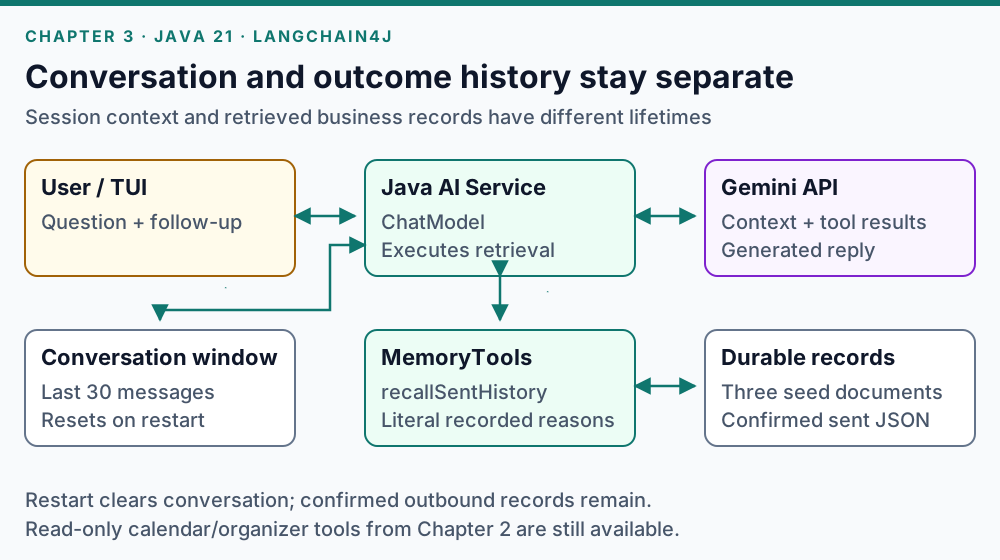
The message window supplies conversation context. MemoryTools separately retrieves seed documents and confirmed sent records; calendar and organizer reads remain available.
var conversation = MessageWindowChatMemory.withMaxMessages(30);
var assistant = AiServices.builder(Assistant.class)
        .chatModel(model)
        .chatMemory(conversation)
        .tools(new McpTools.ReadOnly(mcp), memories)
        .build();
Here, memories is the application’s MemoryTools instance.
The message window retains session context. It does not serve as the record of what was delivered.
The separate retrieval tool reads committed prior-decline documents and confirmed literal messages in state/sent-history.json.
This example uses document retrieval without an embedding store.
Try it: distinguish session context from outcome history
With JDK 21 available, open a terminal and create this chapter’s checkout:
jclaw_round_dir=$(mktemp -d "$PWD/jclaw-round-03.XXXXXX")
git clone --branch round/03-memory --single-branch \
  https://github.com/gamussa/jclaw-devoxx-be-2026.git "$jclaw_round_dir"
cd "$jclaw_round_dir"
cp .env.example .env
Set
GOOGLE_API_KEYin.env, save the file, and launch:./jclaw memoryPaste this request into the app:
Get me out of the Basic AI Proficiency Training on Tuesday, run by Dana from People Ops. Don't reuse an excuse I've already used on her - tell me which ones you're avoiding. Retrieve my recorded decline history. Also remember this conversation marker: violet kiwi.After the reply, paste this follow-up:
What conversation marker did I give you? Which past reasons did you retrieve for Dana from People Ops?Expected: The session can recall
violet kiwi. Retrieval supplies calendar conflict, family obligation, and customer escalation from the three seed documents. Inspect F3 TRACE for the history read rather than accepting an unsupported list. This round sends and records nothing.Stop with Ctrl+C, relaunch from the same checkout, and paste the restart probe:
./jclaw memoryWhat conversation marker did I give you in the previous application session? Separately, retrieve my recorded decline history with Dana from People Ops and list the past reasons to avoid.Expected: The restarted conversation does not know the marker, while the same three document-backed reasons remain retrievable. Confirmed sent records would also survive a restart; this exercise has created none. Stop with Ctrl+C.
Adopt: Store business outcomes separately from conversational context. For multiple users, give each conversation its own memory identity and isolate its durable records.
Read the code: tools/MemoryTools.java, memory/SentHistory.java, and the chat builder in app/DemoSession.java.
Official documentation: Chat Memory and Memory in AI Services.
Chapter 4 — Load reusable instructions when needed
Learn: Runtime skill discovery and a read-only @Tool for loading a selected skill.
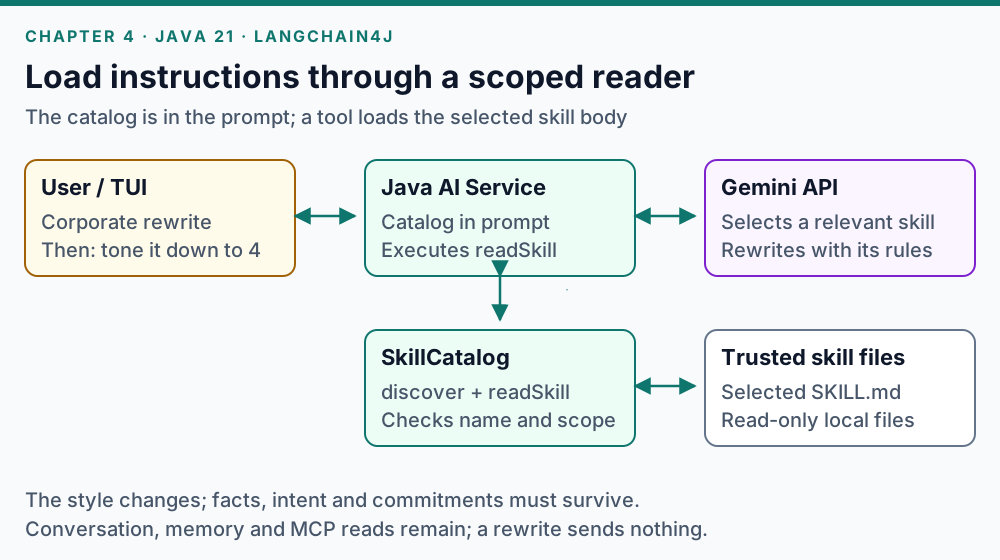
Java supplies catalog metadata in the system prompt. Gemini requests a selected skill body through readSkill; Java validates the selection before returning the instructions.
The demo’s SkillCatalog discovers names and descriptions from a configured directory.
The assistant sees that catalog at startup and loads the relevant SKILL.md body through readSkill before applying it:
interface SkilledAssistant { String reply(String request); }

var skills = new SkillCatalog(skillRoot, toolTrace);
var assistant = AiServices.builder(SkilledAssistant.class)
        .chatModel(model)
        .systemMessageProvider(ignored ->
                "Available skills: " + skills.discover()
                + "\nRead a relevant skill before applying it. Preserve facts.")
        .tools(skills)
        .build();
skillRoot is a trusted directory and toolTrace receives evidence of reads.
SkilledAssistant has no @SystemMessage; an annotated system message would take precedence over this provider.
The application rejects unknown names and paths outside that root.
Loading instructions does not add send permissions.
Try it: load a skill and revise its style
With JDK 21 available, open a terminal and create this chapter’s checkout:
jclaw_round_dir=$(mktemp -d "$PWD/jclaw-round-04.XXXXXX")
git clone --branch round/04-skills --single-branch \
  https://github.com/gamussa/jclaw-devoxx-be-2026.git "$jclaw_round_dir"
cd "$jclaw_round_dir"
cp .env.example .env
Set
GOOGLE_API_KEYin.env, save the file, and launch:./jclaw skillsPaste this request into the app:
Use the corporate-speak skill to rewrite this status update at its default level eleven. Preserve the facts and add no promises: We have resolved the caching issue.Inspect F3 TRACE for
readSkillwithcorporate-speak, then paste:Tone it down to level 4 using the corporate-speak skill. The only fact is: We have resolved the caching issue. Do not add a claim about verification, performance, alignment, or future reliability.Expected: A skill-body read precedes the first rewrite. The second rewrite reduces the jargon while keeping the single caching fact. Conversation context is available, but the follow-up also includes the source text so it is easy to repeat. Neither turn sends or saves a decline. Stop with Ctrl+C.
Adopt: Keep reusable writing rules or operating procedures outside a large permanent prompt. Load only the relevant instructions into the model context.
Framework alternative: LangChain4j also provides langchain4j-skills:1.21.0-beta31, including FileSystemSkillLoader, Skills, and a tool provider.
The current demo uses its own scoped SkillCatalog; adopting the native module would be a separate implementation change.
Read the code: tools/SkillCatalog.java and the registered skills in app/DemoSession.java.
Official documentation: LangChain4j Skills and Agent Skills specification.
Chapter 5 — Build a typed decision and review workflow
Learn: DecisionModel, DecisionRequest, ChoiceQuestion, typed agent methods, and native sequence, conditional, and loop builders.
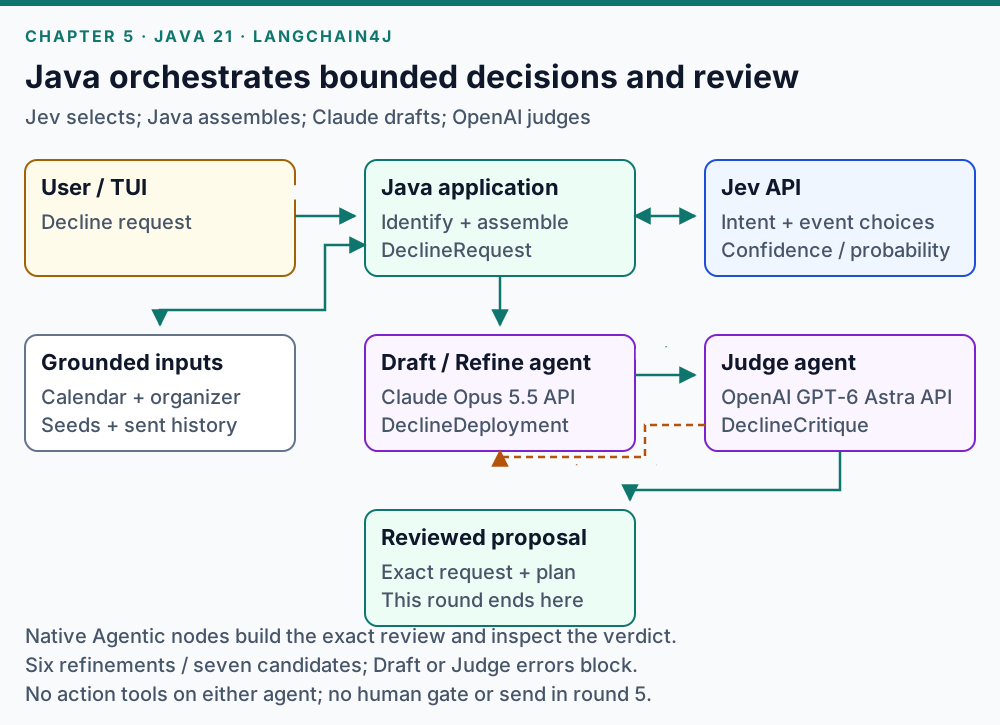
Java owns identity checks, grounded reads and native graph orchestration. Jev returns choices; Claude and OpenAI return typed records. This round ends with a reviewed proposal.
Assign a model to a specific job
| Stage | Current implementation | Input and output |
|---|---|---|
Identify intent and event | Jev | Original message, conversation, calendar → typed choices and probabilities |
Assemble canonical request | Java application code | Verified event and organizer, retrieved memory → |
Chat and skills | Gemini API | Conversation → text |
Draft and Refine | Claude Opus 5.5, Anthropic API | Request and feedback → |
Judge | GPT-6 Astra, OpenAI API | Current request and exact plan → |
Human decision and delivery | Application and native human node; local organizer mock | Approval bound to the current candidate → validated receipt |
Jev makes the bounded intent and event choices. Java verifies the selected identities and assembles the request.
Gemini handles chat and skills; Claude drafts/refines; OpenAI judges. The dashboard and trace show the actual providers and IDs.
JCLAW_DRAFT_MODELdefaults toclaude-opus-5-5;JCLAW_REVIEW_MODELdefaults togpt-6-astra.JCLAW_CHAT_MODELchooses a Gemini model. When blank, it usesJCLAW_GEMINI_MODEL, whose default isgemini-3.7-flash.Jev is the default decider. Set
JCLAW_DECIDER=geminiin your environment or.envto compare Gemini’s routing; it does not act as a failure fallback.
Ask for choices rather than generated labels
This reduced example illustrates one typed routing question:
DecisionModel decider = TypeSafeDecisionModel.builder()
        .apiKey(System.getenv("TYPESAFE_API_KEY"))
        .modelName("jev-1.13.0")
        .build();

var request = DecisionRequest.builder()
        .input(userMessage)
        .question("intent", ChoiceQuestion.builder()
                .text("Does the user request a decline plan or ordinary chat?")
                .option("DECLINE", "A request to decline an obligation")
                .option("CHAT", "Conversation, explanation, or a style rewrite")
                .build())
        .build();
var intent = decider.decide(request).choice("intent");
The demo asks both intent and event questions against the same input.
Event options come from the actual calendar, with NO_MATCH and AMBIGUOUS choices.
Java validates the returned model identity, answer distributions, and the shared 0.60 confidence floors before assembling a canonical request.
An uncertain target asks for clarification before drafting.
Give Draft and Judge different contracts
model/ModelProviders.java creates native API clients for the generation roles:
ChatModel draftModel = AnthropicChatModel.builder()
        .apiKey(System.getenv("ANTHROPIC_API_KEY"))
        .modelName("claude-opus-5-5")
        .maxTokens(8192)
        .returnThinking(false)
        .build();
ChatModel reviewModel = OpenAiChatModel.builder()
        .apiKey(System.getenv("OPENAI_API_KEY"))
        .modelName("gpt-6-astra")
        .supportedCapabilities(Capability.RESPONSE_FORMAT_JSON_SCHEMA)
        .strictJsonSchema(true)
        .store(false)
        .build();
The production builders also attach listeners, set timeouts, and disable automatic retries.
returnThinking(false) selects final answer text; it does not disable Opus 5.5’s adaptive thinking.
The OpenAI client requests strict JSON Schema for the typed Judge output.
store(false) asks OpenAI not to store the response for later retrieval.
See the Anthropic and OpenAI integration documentation.
The generation interfaces return Java records rather than free-form decisions:
interface Drafter {
    @Agent("Draft a decline proposal")
    @UserMessage("Request: {{request}}\nOrganizer: {{organizerContext}}\nPrevious: {{previous}}\nFeedback: {{feedback}}")
    DeclineDeployment draft(@V("request") DeclineRequest request,
                            @V("organizerContext") OrganizerContext organizerContext,
                            @V("previous") String previous,
                            @V("feedback") String feedback);
}

interface Critic {
    @Agent("Review the exact request and candidate")
    @UserMessage("Review: {{review}}\nOrganizer: {{organizerContext}}")
    DeclineCritique review(@V("review") DeclineReview review,
                          @V("organizerContext") OrganizerContext organizerContext);
}
DeclineReview contains both the current request and exact plan.
OrganizerContext carries the exact organizer name and bounded MCP sensitivity alongside the shared records.
Java checks that its organizer matches the request. Both models receive the same context through every refinement.
Use the complete constraints in agent/AgentRoles.java when running the demo; these abbreviated prompts illustrate the signatures.
Typed parsing establishes a shape. Java validation and a separate Judge assess whether the proposal is acceptable.
Neither generation role has action tools.
One native candidate-and-review pass connects the typed roles through named state:
var draftAgent = AgenticServices.agentBuilder(Drafter.class)
        .chatModel(draftModel).outputKey("plan").build();
var assembleReview = AgenticServices.nonAiAgentBuilder(scope ->
        new DeclineReview((DeclineRequest) scope.readState("request"),
                          (DeclineDeployment) scope.readState("plan")))
        .outputKey("review").build();
var judgeAgent = AgenticServices.agentBuilder(Critic.class)
        .chatModel(reviewModel).outputKey("critique").build();

var candidatePass = AgenticServices.sequenceBuilder()
        .subAgents(draftAgent, assembleReview, judgeAgent)
        .outputKey("critique")
        .build();
var critique = (DeclineCritique) candidatePass.invoke(Map.of(
        "request", canonicalRequest,
        "organizerContext", OrganizerContext.fromMcp(
                canonicalRequest.organizerName(), "TOUCHY"),
        "previous", "No previous plan",
        "feedback", ""));
draftModel and reviewModel are independently configured ChatModel instances.
canonicalRequest is assembled from verified application data before invocation.
The example uses the mock’s TOUCHY result; the application passes the actual MCP response.
This fragment shows one pass; the complete workflow adds validation and refinement.
Java reports the avoided reasons separately to the user. Claude writes the outward scripts, and Judge evaluates the typed candidate. Judge does not require the application’s separate report inside that candidate. Both roles must avoid reusing a reason in substance, even when the flavor label changes.
agent/Workflow.java composes those roles with AgenticServices.agentBuilder, nonAiAgentBuilder, sequenceBuilder, conditionalBuilder, and loopBuilder.
Named state keys connect the stages; application nodes prepare the review and inspect its verdict.
The loop allows six refinements after the initial draft: at most seven candidates per request.
Exhaustion, invalid Draft or Judge output, or an unavailable Draft or Judge provider blocks the request.
Automatic retries are disabled, so a single rate-limit or overload error also shows BLOCKED; start a new request after it clears.
This chapter stops at a reviewed proposal.
Try it: review a typed request and reject an identity mismatch
With JDK 21 available, open a terminal and create this chapter’s checkout:
jclaw_round_dir=$(mktemp -d "$PWD/jclaw-round-05.XXXXXX")
git clone --branch round/05-workflow --single-branch \
  https://github.com/gamussa/jclaw-devoxx-be-2026.git "$jclaw_round_dir"
cd "$jclaw_round_dir"
cp .env.example .env
Set
GOOGLE_API_KEY,TYPESAFE_API_KEY,ANTHROPIC_API_KEY, andOPENAI_API_KEYin.env. Save the file, then launch with Jev as the decider:JCLAW_DECIDER=jev ./jclaw workflowPaste this complete fictional request into the app:
Get me out of the Basic AI Proficiency Training on Tuesday, run by Dana from People Ops. Don't reuse a past reason. For this fictional rehearsal, I have a hard release deadline this week and am responsible for final release verification. Ask Dana for permission to prioritize that work over the training. Use only the deadline reason; don't add my conference talk, proficiency, or a calendar conflict. Tell me which past reasons you're avoiding.Press F3 TRACE. Inspect Identify, the assembled request, Draft, and Judge; use F2 CANDIDATE to read the exact outward message.
Expected: Jev selects the intent and event; Java supplies the verified Dana identity and retrieved history; Anthropic Claude produces a typed candidate; OpenAI Judge reviews it. A Judge-approved candidate ends at
PROPOSAL. Rejections may cause refinements or reachBLOCKEDat the shared limit. This round has no human send gate and records no delivery.Paste this complete separate request, including
/new:/new Get me out of the Basic AI Proficiency Training on Tuesday, run by Morgan from People Ops.Expected: The absent organizer requires clarification. The app does not silently choose Dana or run Draft/Judge for that mismatched request. Stop with Ctrl+C.
A red review stage can mean a rejected candidate, not a failed API call.
Inspect MODEL_OUTPUT versus MODEL_ERROR in F3 TRACE before diagnosing the provider.
To repeat a decline request, restart the app first: /new starts a separate request but retains this session’s proposed reasons.
Restarting clears proposed reasons while preserving confirmed sent history in that checkout.
Adopt: Use a decision model for bounded choices, a generation model for drafting, and application code for identity and state validation. Carry a real refinement budget across the request.
Read the code: agent/JevDecider.java, domain/Contracts.java, agent/AgentRoles.java, and agent/Workflow.java.
Official documentation: Decision Models, TypeSafe integration, Structured Outputs, and Agents and Agentic AI.
Chapter 6 — Bind human approval to the reviewed candidate
Learn: humanInTheLoopBuilder; enforce the action boundary in ordinary Java.
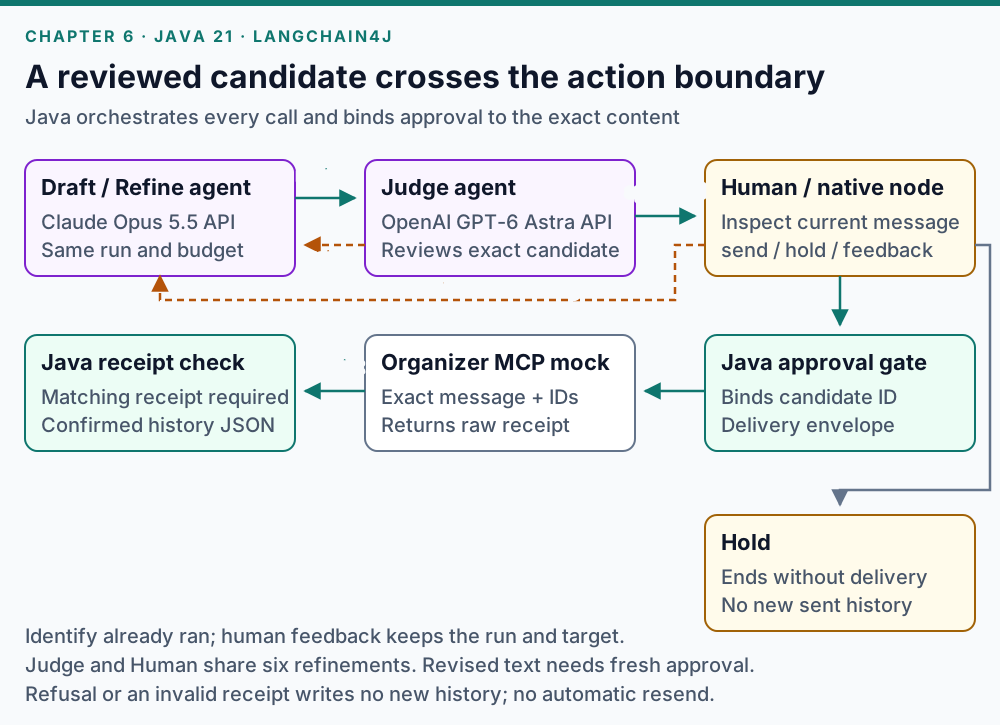
Java resumes the same request after feedback and runs fresh Refine → Judge → Human review. The application binds send approval and checks the mock receipt before writing history.
The native human node records a verdict supplied by the application:
var humanNode = AgenticServices.humanInTheLoopBuilder()
        .description("Human verdict on the current reviewed candidate")
        .responseProvider(scope -> scope.readState("humanFeedback"))
        .outputKey("humanVerdict")
        .build();
The terminal waits for your input between native workflow invocations. The demo does not implement durable workflow suspension or recovery after a process restart. Its human node also does not implement the application’s candidate binding or delivery validation.
The application enforces four rules:
Judge rejection and human feedback share one budget of six refinements.
A human cannot approve a candidate that Judge rejected.
Approval applies to the current candidate. A revised message needs fresh approval.
History is written only after a valid receipt matches the call, candidate, event, and organizer IDs and includes a delivery timestamp.
Each exercise below starts from its own checkout with only the three seeded prior declines. You can run any one independently; the successful delivery exercise cannot make its reason unavailable in the other two.
Try it: revise, review again, and hold
With JDK 21 available, open a terminal and create this exercise’s checkout:
jclaw_round_dir=$(mktemp -d "$PWD/jclaw-round-06-review.XXXXXX")
git clone --branch round/06-guardrails --single-branch \
  https://github.com/gamussa/jclaw-devoxx-be-2026.git "$jclaw_round_dir"
cd "$jclaw_round_dir"
cp .env.example .env
Set
GOOGLE_API_KEY,TYPESAFE_API_KEY,ANTHROPIC_API_KEY, andOPENAI_API_KEYin.env. Save the file and launch:JCLAW_DECIDER=jev JCLAW_MOCK_DELIVERY=success ./jclaw guardrailsPaste this complete fictional request into the app:
Get me out of the Basic AI Proficiency Training on Tuesday, run by Dana from People Ops. Don't reuse a past reason. For this fictional rehearsal, I have a hard release deadline this week and am responsible for final release verification. Ask Dana for permission to prioritize that work over the training. Use only the deadline reason; don't add my conference talk, proficiency, or a calendar conflict. Tell me which past reasons you're avoiding.Wait for a Judge-approved
HUMANcandidate, read it with F2 CANDIDATE, and paste this feedback into the app:Make the email shorter and more direct. Keep only the release deadline and final-verification responsibility as the reason. Do not add a conference talk, proficiency, or a calendar conflict.Expected: Refine → fresh Judge → fresh human review. The event, organizer, and run stay the same; the refinement counter continues, and Identify does not run again. Automatic Judge rejection and this human revision consume the same six-refinement budget.
Wait for the revised, approved
HUMANcandidate, then enter:holdExpected: The request ends held, with no send and no new confirmed-history record. Stop with Ctrl+C. If review reaches
BLOCKED, inspect the verdict instead of trying to approve it; repeat from a fresh launch when ready.
At HUMAN, ordinary text is feedback on the pending candidate.
Use /chat … for ordinary conversation while approval waits, or /new … to start a separate request.
Restart before repeating a reason in the same checkout; /new retains current-session proposed reasons, while restart preserves confirmed history.
Try it: confirm delivery before saving history
Stop any previous app. With JDK 21 available, open a terminal and create this delivery exercise’s independent checkout:
jclaw_round_dir=$(mktemp -d "$PWD/jclaw-round-06-delivery.XXXXXX")
git clone --branch round/06-guardrails --single-branch \
  https://github.com/gamussa/jclaw-devoxx-be-2026.git "$jclaw_round_dir"
cd "$jclaw_round_dir"
cp .env.example .env
Set
GOOGLE_API_KEY,TYPESAFE_API_KEY,ANTHROPIC_API_KEY, andOPENAI_API_KEYin.env. Save the file and launch the successful mock:JCLAW_DECIDER=jev JCLAW_MOCK_DELIVERY=success ./jclaw guardrailsPaste this complete fictional request into the app:
Get me out of the Basic AI Proficiency Training on Tuesday, run by Dana from People Ops. Don't reuse a past reason. For this fictional rehearsal, I have a hard release deadline this week and am responsible for final release verification. Ask Dana for permission to prioritize that work over the training. Use only the deadline reason; don't add my conference talk, proficiency, or a calendar conflict. Tell me which past reasons you're avoiding.Wait for a Judge-approved
HUMANcandidate, read the exact email with F2 CANDIDATE, then enter:sendExpected: The local organizer mock returns a matching receipt. The trace records
DELIVEREDfollowed byMEMORY_SAVED; nobody outside the demo is contacted. A rejected or blocked candidate cannot be sent.Stop with Ctrl+C, then inspect the saved record in the same terminal:
cat state/sent-history.jsonExpected: A confirmed record contains the literal approved message and matching identities. Keep this file: its deadline reason is now used in this checkout and remains used after restart. For a repeat from seed-only history, rerun this exercise’s checkout commands to create a new directory.
Try it: refuse a mismatched delivery receipt
Stop any previous app. With JDK 21 available, open a terminal and create this failure exercise’s independent checkout:
jclaw_round_dir=$(mktemp -d "$PWD/jclaw-round-06-receipt.XXXXXX")
git clone --branch round/06-guardrails --single-branch \
  https://github.com/gamussa/jclaw-devoxx-be-2026.git "$jclaw_round_dir"
cd "$jclaw_round_dir"
cp .env.example .env
Set
GOOGLE_API_KEY,TYPESAFE_API_KEY,ANTHROPIC_API_KEY, andOPENAI_API_KEYin.env. Save the file and launch the wrong-candidate mock in plain mode:JCLAW_DECIDER=jev JCLAW_MOCK_DELIVERY=wrong-candidate ./jclaw guardrails plainPaste this complete fictional request into the app:
Get me out of the Basic AI Proficiency Training on Tuesday, run by Dana from People Ops. Don't reuse a past reason. For this fictional rehearsal, I have a hard release deadline this week and am responsible for final release verification. Ask Dana for permission to prioritize that work over the training. Use only the deadline reason; don't add my conference talk, proficiency, or a calendar conflict. Tell me which past reasons you're avoiding.Wait for a Judge-approved
HUMANcandidate, read the literal outward message in the plain output, then enter:sendExpected:
UNCONFIRMEDwith a receipt-identity mismatch. There is noDELIVEREDorMEMORY_SAVEDevent, and no automatic resend. An uncertain receipt does not establish what the organizer received.Enter
/quit, then verify that no confirmed-history file was created in this fresh checkout:if [ -e state/sent-history.json ]; then cat state/sent-history.json else printf '%s\n' 'No confirmed history was written.' fiExpected:
No confirmed history was written.The successful delivery exercise’s separate history remains intact.
Adopt: Treat approval as a decision about specific content. Record only confirmed outcomes, and reconcile uncertain delivery before retrying. A content hash binds a candidate; it does not provide authentication or server-side idempotency.
Read the code: agent/Workflow.java (ApprovalGate), app/DemoSession.java, domain/Delivery.java, and memory/SentHistory.java.
Official documentation: Human in the loop.
This chapter’s delivery gate is application logic; LangChain4j input and output guardrails are a separate API.
Chapter 7 — Observe what actually ran
Learn: ChatModelListener, DecisionModelListener, native AgentListener callbacks, and HTML reports from AgentMonitor.
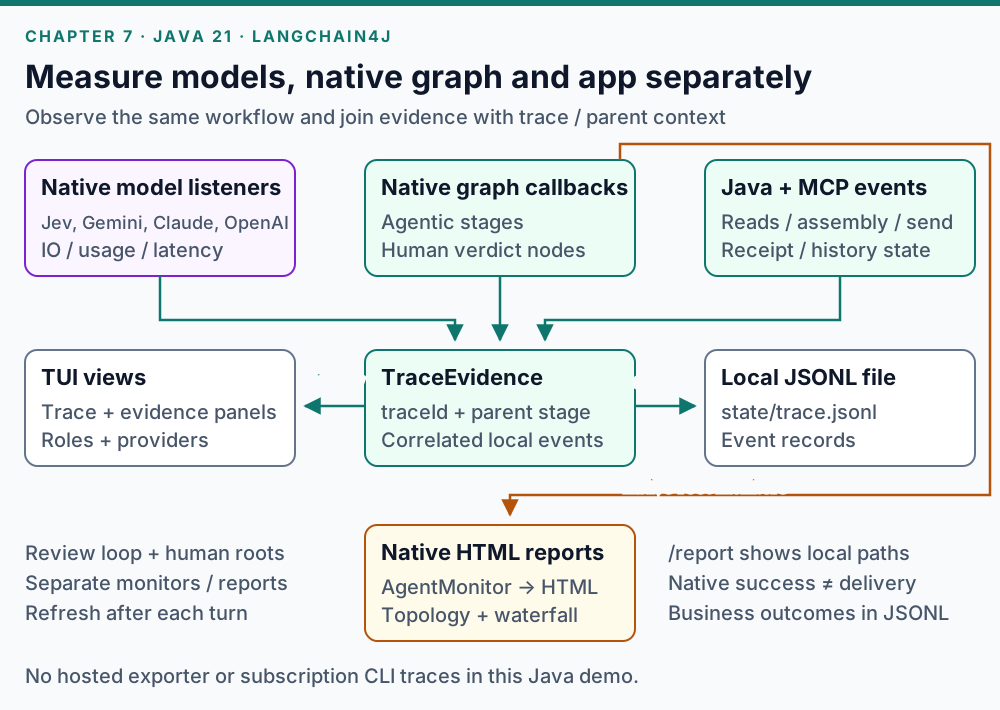
Native model and graph listeners emit their own observations. Java and MCP events describe application operations; TraceEvidence correlates them for the local file and dashboard.
A minimal chat listener can measure a model interaction without logging its prompt:
ChatModelListener listener = new ChatModelListener() {
    private final Object started = new Object();

    @Override
    public void onRequest(ChatModelRequestContext context) {
        context.attributes().put(started, System.nanoTime());
    }

    @Override
    public void onResponse(ChatModelResponseContext context) {
        long elapsed = System.nanoTime()
                - (Long) context.attributes().get(started);
        System.out.println("durationMs=" + elapsed / 1_000_000
                + " usage=" + context.chatResponse().tokenUsage());
    }
};
// Attach with .listeners(List.of(listener)) on each provider's model builder.
The complete demo also records model errors, Jev’s typed decisions and probabilities, and native agent callbacks.
Application events separately describe MCP reads, canonical request assembly, human waiting, delivery receipts, and history writes.
The local trace is state/trace.jsonl; it includes fictional model inputs and outputs and should not be treated as a production logging policy.
LangChain4j can also generate a self-contained HTML report of a native graph’s topology and execution history. Attach a monitor to a Draft → assemble-review → Judge sequence:
AgentMonitor monitor = new AgentMonitor();
var monitoredPass = AgenticServices.sequenceBuilder()
        .name("draftAndJudge")
        .subAgents(draftAgent, assembleReview, judgeAgent)
        .listener(monitor)
        .build();
monitoredPass.invoke(Map.of(
        "request", canonicalRequest,
        "organizerContext", OrganizerContext.fromMcp(
                canonicalRequest.organizerName(), "TOUCHY"),
        "previous", "No previous plan",
        "feedback", ""));
HtmlReportGenerator.generateReport(monitor, Path.of("review-loop.html"));
Here, draftAgent, assembleReview, and judgeAgent are the typed nodes built in agent/Workflow.java, and canonicalRequest contains the verified event and retrieved history.
This snippet illustrates report wiring; the demo’s full workflow adds the bounded loop, safety checks, and shared human-refinement budget.
The app attaches one monitor to the review loop and another to the human sequence, then updates both reports after each turn.
Enter /report in the TUI or plain app to get their paths: state/reports/<traceId>/review-loop.html and human-review.html.
Open the files in a browser and refresh after a revision or verdict.
The native reports show Draft/Judge iterations and submitted human verdicts. Jev Identify, ordinary chat, MCP reads, approval gating, delivery and history remain in JSONL/TUI evidence. Native scope/session IDs differ from the application trace ID in the directory name. A native "success" means the invocation completed; it does not mean the draft was approved or delivered.
Try it: follow a revision through trace and HTML reports
With JDK 21 available, open a terminal and create this chapter’s checkout:
jclaw_round_dir=$(mktemp -d "$PWD/jclaw-round-07.XXXXXX")
git clone --branch round/07-observability --single-branch \
  https://github.com/gamussa/jclaw-devoxx-be-2026.git "$jclaw_round_dir"
cd "$jclaw_round_dir"
cp .env.example .env
Set
GOOGLE_API_KEY,TYPESAFE_API_KEY,ANTHROPIC_API_KEY, andOPENAI_API_KEYin.env. Save the file and launch:JCLAW_DECIDER=jev JCLAW_MOCK_DELIVERY=success ./jclaw observabilityPaste this complete fictional request into the app:
Get me out of the Basic AI Proficiency Training on Tuesday, run by Dana from People Ops. Don't reuse a past reason. For this fictional rehearsal, I have a hard release deadline this week and am responsible for final release verification. Ask Dana for permission to prioritize that work over the training. Use only the deadline reason; don't add my conference talk, proficiency, or a calendar conflict. Tell me which past reasons you're avoiding.Wait for a Judge-approved
HUMANcandidate, inspect F2 CANDIDATE and F3 TRACE, then paste this feedback:Make the email shorter and more direct. Keep only the release deadline and final-verification responsibility as the reason. Do not add a conference talk, proficiency, or a calendar conflict.Expected: Claude Refine and a fresh OpenAI Judge run. Jev Identify does not run again. A red verification stage is a candidate rejection; use
MODEL_OUTPUTandMODEL_ERRORto distinguish a completed provider response from an API failure. If the shared six-refinement limit is exhausted, the app blocks instead of allowing approval.After the revised candidate reaches approved
HUMAN, enter these commands one at a time:hold/reportExpected: The request is held.
/reportprints the absolute paths for this session’sreview-loop.htmlandhuman-review.html; it makes no model call. Copy each printed path into your browser’s address bar and press Enter. The review report shows both native review invocations, including any automatic refinement passes, and the human report records feedback and hold. There is no delivery or new confirmed-history record.
Stop with Ctrl+C. If jq is installed, run this optional command in the same checkout to count the last session’s events:
jclaw_trace_id=$(tail -n 1 state/trace.jsonl | jq -r '.traceId')
jq -n --arg traceId "$jclaw_trace_id" '
  reduce inputs as $event (
    {DECISION_OUTPUT: 0, MODEL_OUTPUT: 0, AGENTIC_GRAPH: 0,
     CANDIDATE: 0, VERDICT: 0, HUMAN_HOLD: 0,
     DELIVERED: 0, MEMORY_SAVED: 0};
    if $event.traceId == $traceId then
      if has($event.kind) then .[$event.kind] += 1 else . end
    else . end
  )
' state/trace.jsonl
Expected: DECISION_OUTPUT is 1; candidate, verdict, model-output, and native graph counts reflect the actual iterations. HUMAN_HOLD is 1, while DELIVERED and MEMORY_SAVED are 0.
The trace file appends across launches; the command filters by traceId rather than mixing sessions.
Separate native graph callbacks from application stages when explaining the trace.
API usage and elapsed time are visible; there is no hosted telemetry exporter or subscription CLI usage in this implementation.
Adopt: Correlate model, tool, workflow, and business events. Attach a role and actual provider to measurements, and choose which content your production logs may retain.
Try it: generate HTML reports without provider calls
With JDK 21 available, open a terminal and create a separate fixture checkout:
jclaw_round_dir=$(mktemp -d "$PWD/jclaw-round-07-fixture.XXXXXX")
git clone --branch round/07-observability --single-branch \
  https://github.com/gamussa/jclaw-devoxx-be-2026.git "$jclaw_round_dir"
cd "$jclaw_round_dir"
Fetch the pinned shared sources, then run the prepared-response report fixture:
bash scripts/shared.sh
./gradlew :app:reportFixture --console=plain
Expected:
BUILD SUCCESSFULand two native HTML files understate/report-fixture/. No API keys or chat prompt are needed: the fixture supplies prepared model responses to real native workflow execution. The initial build can download Gradle dependencies; it makes no provider call.Open the generated files in your browser. On macOS, run:
open state/report-fixture/review-loop.html
open state/report-fixture/human-review.html
On Linux with a desktop browser, use
xdg-openin place ofopen. The reports show the fixture’s refinement and human verdicts; they are separate from your live session’s reports.
Read the code: observability/TraceEvidence.java, observability/GraphEvents.java, agent/WorkflowReports.java, and report wiring in app/Main.java.
Official documentation: Observability, Decision model listeners, and Agentic monitoring and HTML reports.
Continue in your own application
Choose a workflow with a concrete reviewable result, such as a support-ticket reply, a change proposal, or a calendar suggestion. Keep the Java records, limited tool surface, separate outcome history, bounded review loop, and approval of exact content. Replace the scenario and integrations one at a time, verifying the contract at each boundary.
For the accompanying demo, the provider-free validation command is:
./gradlew :app:check :app:installDist :mocks:mcpJars --console=plainThe checks exercise typed parsing, workflow limits, approval binding, delivery failure cases, and restart persistence. They use network-boundary model fixtures; a passing test is separate from a live provider result.
For more context, read LangChain4j for Java developers or explore the Kafka, Flink, and Tableflow workshop to practice grounding applications in real data. Viktor’s related talks include Codepocalypse Now and MCP integrations.
About the author
Viktor Gamov is a Java Champion, developer advocate, and coauthor of Kafka in Action. He teaches Java, data systems, and AI application development through conference talks and hands-on workshops. See his background, GitHub projects, and speaking history.
References
Showdown provider note: The comparison handoff assigns Claude (Anthropic) subscription CLI to Draft/Refine and Codex (OpenAI) subscription CLI to Judge.
This Java version uses Claude Opus 5.5 through the Anthropic API and GPT-6 Astra through the OpenAI API.
Call its critic an OpenAI API Judge; it does not launch Codex CLI. Compare API and subscription usage separately.
The selected IDs are documented in Claude Opus 5.5 and GPT-6 Astra.
These are runtime model roles, separate from the coding assistants used to build the demo.
The Koog app wires those calls in Strategy.kt, constructs Claude agents in CliCritic.kt, and launches codex exec --output-schema through TypedCodex.kt.
Quarkus LangChain4j workshop, a companion resource for readers who want Quarkus integration. This workshop uses direct Java builders.